[JavaScript] 10. 객체(Object)
# 객체(Object)
키(key)와 값(value)으로 구성된 프로퍼티(property)들의 집합입니다. 프로퍼티의 값은 자바스크립트에서 사용할 수 있는 모든 값을 담을 수 있습니다.
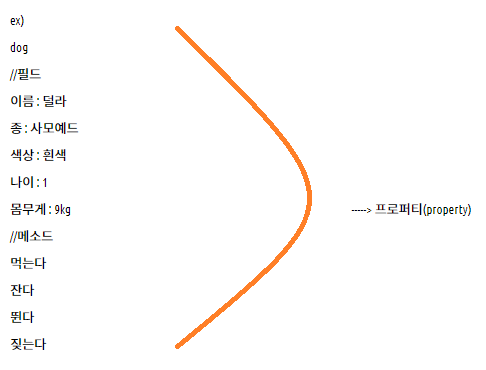
* 프로퍼티(property)
프로퍼티 키(이름)와 프로퍼티 값으로 구성됩니다. 프로퍼티는 프로퍼티 키로 유일하게 식별할 수 있습니다. 프로퍼티 키는 프로퍼티를 식별하기 위한 식별자이며 프로퍼티 값으로 사용할 수 있는 값은 빈 문자열을 포함하는 모든 문자열 또는 symbol 값입니다.
ex)
const dog = {
name: '덜라',
family: '사모예드',
age: 1,
weight: 9.0,
play: function(){
console.log('뛰어놉니다.');
}
}
console.log(dog.name) // 덜라
dog.play(); // 뛰어놉니다.
console.log(dog.play) // function(){ console.log('뛰어놉니다.'); }
● 객체를 생성하는 방법
1. 리터럴 표기법을 이용한 객체의 생성
자바스크립트에서 객체를 생성하는 가장 쉽고, 간단한 방법입니다.
const 객체명 = {
프로퍼티명1: 값1,
프로퍼티명2: 값2,
프로퍼티명3: function(){ },
...
}
예시 )
<script>
	'use strict'
        let a; // 변수
        let b = {}; // 객체

        const dog1 = "뽀미"; // "": 배열 {}: 객체
        const dog2 = {
            name: '덜라',
            family: '사모예드',
            color: 'white',
            age: 1,
            weight: 9.0,
            play: function(){
                console.log('뛰어놉니다.');
            }
        };

        console.log(`dog1: ${dog1}`);
        console.log(`dog2: ${dog2}`);
        console.dir(dog2);

        console.log(`dog2.name : ${dog2.name}`);
        console.log(`dog2.family : ${dog2.family}`);
        console.log(`dog2.color : ${dog2.color}`);
        console.log(`dog2.age : ${dog2.age}`);
        console.log(`dog2.weight : ${dog2.weight}`);
        console.log(`dog2.play : ${dog2.play}`);
        dog2.play();
</script>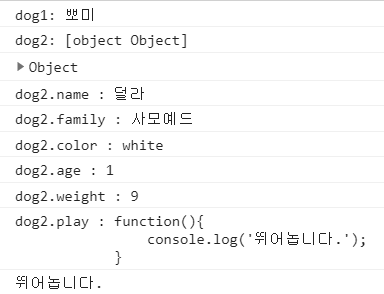
2. 생성자를 이용한 객체의 생성
new 연산자를 사용하여 객체를 생성하고 초기화 할 수 있습니다. 이 때 사용되는 메소드를 생성자라고 하며, 이 메소드를 새롭게 생성되는 객체를 초기화하는 역할을 합니다.
function 생성자명(매개변수1, 매개변수2 ..){
프러퍼티명1 = 값1;
프러퍼티명2 = 값2;
프러퍼티명3 = function(){ };
...
}
const 객체명1 = new 생성자이름(값1, 값2 ...);
const 객체명2 = new 생성자이름(값1, 값2 ...);
* 리터럴과 차이점 : 객체를 여러개 생성이 가능하다
예시 1)
<script>
        'use strict'
        function triangle(b, h){
            this.base = b;
            this.height = h;
            this.area = function(){
                return this.base * this.height / 2;
            }
        }
        const tg1 = new triangle(10, 10);
        console.log(`tg1.base : ${tg1.base}`);
        console.log(`tg1.height : ${tg1.height}`);
        console.log(`tg1.area() : ${tg1.area()}`);
        console.dir(tg1);
</script>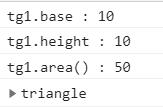
예시 2)
<script>
        'use strict'
        function triangle(b, h){
            this.base = b;
            this.height = h;
            this.area = function(){
                return this.base * this.height / 2;
            }
        }
        const tg2 = new triangle(20, 5);
        console.log(`tg2.base : ${tg2.base}`);
        console.log(`tg2.height : ${tg2.height}`);
        console.log(`tg2.area() : ${tg2.area()}`);
</script>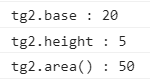
* 프로토타입(prototype)
자바스크립트의 모든 객체는 프로토타입이라는 객체를 가지고 있습니다. 모든 객체는 그들의 프로토타입으로부터 프로퍼티와 메소드를 상속받습니다. 이처럼 자바스크립트의 모든 객체는 최소한 하나 이상의 다른 객체로부터 상속을 받으며, 이 때 상속되는 정보를 제공하는 객체를 프로토타입이라고 합니다.
const tg1 = new triangle(100, 100); // --> tg1의 객체의 프로토타입은 triangle.prototype 입니다.
* 자바스크립트에 내장된 모든 생성자나 사용자 정의 생성자는 Object.prototype와 자신의 생성자 객체를 프로토타입으로 가집니다.
tg1 <--- triangle.prototype
<--- Object.prototype
두가지 타입을 상속받는다.
예시 1)
<script>
        'use strict'
        function Dog(color, name, age){
            this.color = color;
            this.name = name;
            this.age = age;
        }
        let dollar = new Dog("white", "덜라", 1);
        console.log(dollar);
        console.log(dollar.color);
        console.log(dollar.name);
        console.log(dollar.age);
</script>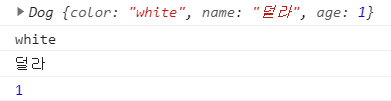
<script>
        'use strict'
        function Dog(color, name, age){
            this.color = color;
            this.name = name;
            this.age = age;
        }
        dollar.family = '사모예드';     // dollar 객체에 추가
        dollar.breed = function(){  // 객체 직접적 추가
            return this.color + ' ' + this.family;
        }
        console.log(dollar);
</script>
<script>
        'use strict'
        function Dog(color, name, age){
            this.color = color;
            this.name = name;
            this.age = age;
        }
        let ppomi = new Dog("white", "뽀미", 4);
        console.log(ppomi);
</script>
<script>
        'use strict'
        function Dog(color, name, age){
            this.color = color;
            this.name = name;
            this.age = age;
        }

        let dollar = new Dog("white", "덜라", 1);

        dollar.family = '사모예드';     // dollar 객체에 추가
        dollar.breed = function(){  // 객체 직접적 추가
            return this.color + ' ' + this.family;
        }
        console.log(dollar.family);
        console.log(dollar.breed());
</script>
<script>
        'use strict'
        function Dog(color, name, age){
            this.color = color;
            this.name = name;
            this.age = age;
        }

        let ppomi = new Dog("white", "뽀미", 4);
        console.log(ppomi.family); // undefined
        console.log(ppomi.breed()); // error
</script>
* family, breed 는 dollar 객체에 직접적으로 추가 했기 때문에 ppomi 에는 적용되지 않는다.
예시 2)
<script>
        'use strict'
        function Dog(color, name, age){
            this.color = color;
            this.name = name;
            this.age = age;
            // this.family = "포메리안";
            // this.breed = function(){
            //     return this.color + " " + this.family;
            // } 밑에와 같은 의미
        }

        Dog.prototype.family = '사모예드';
        // 생성자 자체에 객체 추가
        Dog.prototype.breed = function(){
            return this.color + " " + this.family;
        }

        let dollar = new Dog('white', '덜라', 1);
        console.log(dollar);
        console.log(dollar.color);
        console.log(dollar.name);
        console.log(dollar.age);
        console.log(dollar.family);
        console.log(dollar.breed());

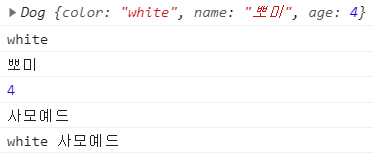
        let ppomi = new Dog('white', '뽀미', 4);
        console.log(ppomi);
        console.log(ppomi.color);
        console.log(ppomi.name);
        console.log(ppomi.age);
        console.log(ppomi.family);
        console.log(ppomi.breed());
</script>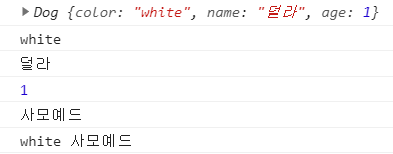
3. 클래스를 이용한 객체의 생성(ECMA6 추가)
● 클래스 선언식
class 클래스명 {
constuctor(매개변수1, 매개변수2 .. ){
프러퍼티명1 = 값1;
프러퍼티명2 = 값2;
...
}
}
const 객체명 = new 클래스명(값1, 값2 ..);
* 객체를 무조건 만들어야한다.
* 클래스는 호이스팅이 되지 않는다.
● 클래스 표현식
let 변수명 = class {
프러퍼티명1 = 값1; // public
#프러퍼티명2 = 값2; // private
static 프러퍼티명3 = 값3 // static
constuctor(매개변수1, 매개변수2 .. ){
프러퍼티명1 = 값1;
프러퍼티명2 = 값2;
...
}
}
const 객체명 = new 변수명(값1, 값2 ..);
* 익명클래스로 대부분 사용한다.
● 메소드 정의
let 변수명 = class {
constuctor(매개변수1, 매개변수2 .. ){
프러퍼티명1 = 값1;
프러퍼티명2 = 값2;
...
}
메소드명(매개변수1, 매개변수2 ..){
실행문;
return(옵션)
}
set 메소드명(매개변수1, 매개변수2 ..){
실행문;
// * set 반드시 매개변수가 있어야한다.
}
get 메소드명(){
실행문;
return 값;
// * get 반드시 return 있어야한다.
}
}
예시 )
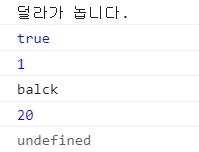
<script>
        'use strict'
        class Dog{
            weight = 20.0;          // public
            #family = '사모예드';   // # : private
            static x = 0;
            constructor(name, color, age){
                this.name = name;
                this.color = color;
                this.age = age;
            }
            play(){
                console.log(`${this.name}가 놉니다.`);
            }
            get getAge(){
                return this.age;
            }
            set setColor(color){
                this.color = color;
            }
        }

        const dollar = new Dog('덜라', 'white', 1);
        dollar.play();
        console.log(dollar instanceof Dog);
        console.log(dollar.getAge);
        dollar.setColor = 'balck';
        console.log(dollar.color);
        console.log(dollar.weight);     // public
        console.log(dollar.family);     // private
</script>