[Spring Boot 입문] View 환경설정

# Welcome Page 만들기
경로 : resources/static/index.html
<!DOCTYPE HTML>
<html>
<head>
    <title>Hello</title>
    <meta http-equiv="Content-Type" content="text/html; charset=UTF-8" />
</head>
<body>
Hello
<a href="/hello">hello</a>
</body>
</html>
작성 후 실행하게 되면 결과 화면
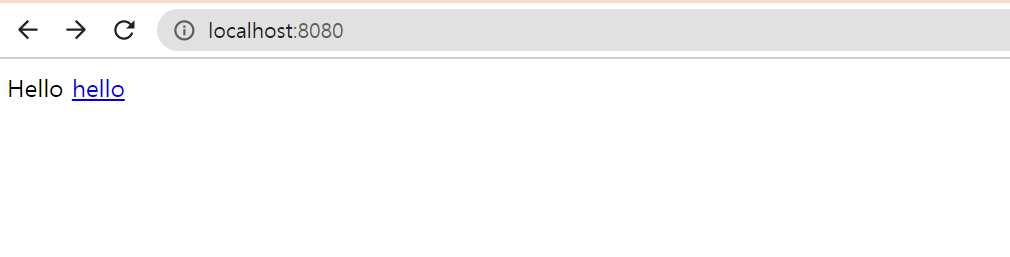
1. 스프링 부트가 제공하는 Welcome Page 기능
- static/index.html 을 올려두면 Welcome Page 기능을 제공한다.
https://docs.spring.io/spring-boot/docs/2.6.3/reference/htmlsingle/http://docs.spring.io/spring-boot/docs/2.6.3.RELEAE/reference/html/spring-boot-features.
Index of /spring-boot/docs/2.6.3
docs.spring.io
thymeleaf 템플릿 엔진
- thymeleaf 공식 사이트 : https://www.thymeleaf.org/
Thymeleaf
Integrations galore Eclipse, IntelliJ IDEA, Spring, Play, even the up-and-coming Model-View-Controller API for Java EE 8. Write Thymeleaf in your favourite tools, using your favourite web-development framework. Check out our Ecosystem to see more integrati
www.thymeleaf.org
- 스프링부트 메뉴얼 : https://docs.spring.io/spring-boot/docs/2.6.3/reference/htmlsingle/
Spring Boot Reference Documentation
This section goes into more detail about how you should use Spring Boot. It covers topics such as build systems, auto-configuration, and how to run your applications. We also cover some Spring Boot best practices. Although there is nothing particularly spe
docs.spring.io
package hello.hellospring.controller;

import org.springframework.stereotype.Controller;
import org.springframework.ui.Model;
import org.springframework.web.bind.annotation.GetMapping;

@Controller
public class HelloController {

    @GetMapping("hello")
    public String hello(Model model) {
        model.addAttribute("data", "hello!!");
        return "hello";
    }
}
@Controller
- 뷰에 표시될 데이터가 있는 Model 객체를 만들고 올바른 뷰를 선택하는 일을 담당합니다.
@GetMapping
- GET 요청을 하는 API의 annotation으로 데이터를 가져올 때 사용한다.
<!DOCTYPE HTML>
<html xmlns:th="http://www.thymeleaf.org">
<head>
    <title>Hello</title>
    <meta http-equiv="Content-Type" content="text/html; charset=UTF-8" />
</head>
<body>
<p th:text="'안녕하세요. ' + ${data}" >안녕하세요. 손님</p>
</body>
</html>
2. thymeleaf 템플릿엔진 동작 확인
실행 : http://localhost:8080/hello
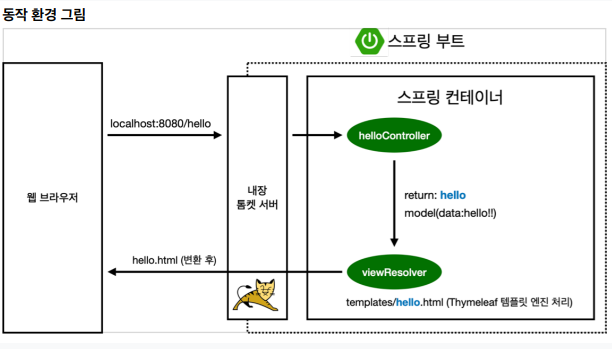
3. 동작 환경 그림
[무료] 스프링 입문 - 코드로 배우는 스프링 부트, 웹 MVC, DB 접근 기술 - 인프런 | 강의
스프링 입문자가 예제를 만들어가면서 스프링 웹 애플리케이션 개발 전반을 빠르게 학습할 수 있습니다., - 강의 소개 | 인프런...
www.inflearn.com
컨트롤러에서 리턴값으로 문자를 반환하면 뷰 리졸버(viewResolver)가 화면을 찾아서 처리한다.
- 스프링 부트 템플릿엔진 기본 viewName 매핑
- resources:temlates/ + {ViewName} + .html
참고: spring-boot-devtools 라이브러리를 추가하면, html 파일을 컴파일만 해주면 서버 재시작 없이 View 파일 변경이 가능하다.
인텔리j 컴파일 방법 : 메뉴 build -> Recompile