[Kotlin] 13. 안드로이드 레이아웃(layout) 종류
#레이아웃 (Layout)
View 위젯의 배치를 위한 컨테이너 역할을 하는 객체를 말한다.

* [MainActivity]파일에서 activity_main.xml 파일과 연결된 것을 확인 할 수 있다.!
# 레이아웃 종류
● 속성
match_parent : 해상도와 상관없이 화면을 꽉 채워준다는 뜻 ( 전체 화면 100% )
wrap_content : 크기가 정해져 있지 않지만 text 크기만큼만 지정한다는 뜻
1. LinearLayout (리니어 레이아웃)
View 위젯들을 선언하여 가로(Horizontal) 또는 세로(Vertical)로 순서대로 나열하는 레이아웃입니다.
| orientation | LinearLayout 에 반드시 들어가는 속성 데이터가 들어가는 방향을 정해줍니다. |
| gravity | 자식 View들의 중력방향을 결정합니다. |
| layout_gravity | 레이아웃안에서 어디에 위치 할건지를 정해준다. |
| ignoregravity | gravity 설정 상태에서 특정 자식 View에 대해 속성을 무시합니다. |
예시 )
<LinearLayout
    xmlns:android="http://schemas.android.com/apk/res/android"
    android:layout_width="match_parent"
    android:layout_height="match_parent"
    android:gravity="center"
    android:orientation="vertical"
    >
<TextView
        android:layout_width="wrap_content"
        android:layout_height="wrap_content"
        android:text="가운데 영역"
        android:textSize="20dp"
        />
</LinearLayout>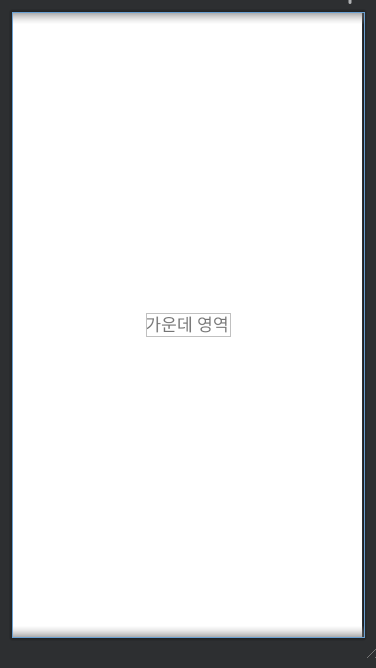
예시 2)
<LinearLayout
    xmlns:android="http://schemas.android.com/apk/res/android"
    android:layout_width="match_parent"
    android:layout_height="match_parent"
    android:gravity="center"
    android:orientation="vertical"
    >
<TextView
        android:layout_width="200dp"
        android:layout_height="200dp"
        android:layout_gravity=""
        android:gravity="right|center"
        android:text="우측 가운데 영역"
        />
</LinearLayout>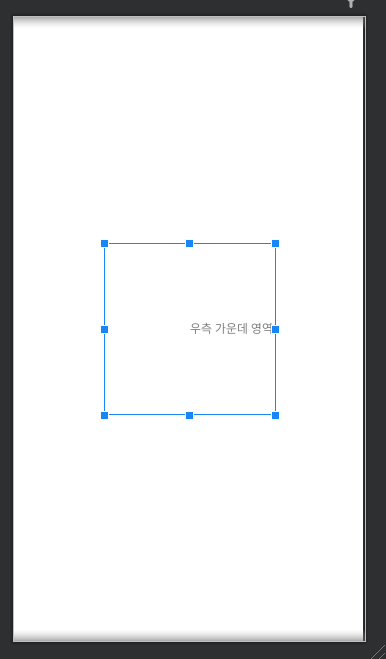
예시 3)
<LinearLayout
    xmlns:android="http://schemas.android.com/apk/res/android"
    android:layout_width="match_parent"
    android:layout_height="match_parent"
    android:gravity="center"
    android:orientation="vertical"
    >
<LinearLayout
        android:layout_width="wrap_content"
        android:layout_height="wrap_content"
        android:orientation="horizontal"
        >
        <TextView
            android:layout_width="wrap_content"
            android:layout_height="wrap_content"
            android:background="#F44336"
            android:text="1번"
            android:textSize="20dp"
            />
        <TextView
            android:layout_width="wrap_content"
            android:layout_height="wrap_content"
            android:background="#cddc39"
            android:text="2번"
            android:textSize="20dp"
            />
        <TextView
            android:layout_width="wrap_content"
            android:layout_height="wrap_content"
            android:background="#673ab7"
            android:text="3번"
            android:textSize="20dp"
            />
    </LinearLayout>
</LinearLayout> 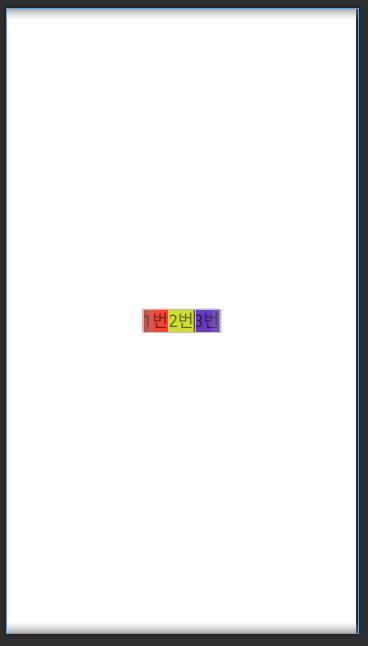
예시 4)
<LinearLayout
    xmlns:android="http://schemas.android.com/apk/res/android"
    android:layout_width="match_parent"
    android:layout_height="match_parent"
    android:gravity="center"
    android:orientation="vertical"
    >
<LinearLayout
        android:layout_width="match_parent"
        android:layout_height="wrap_content"
        android:orientation="horizontal">
        <TextView
            android:layout_width="0dp"
            android:layout_height="wrap_content"
            android:layout_weight="1"
            android:background="#3f51b5"
            android:text="1번"
            android:textSize="20dp"/>
        <TextView
            android:layout_width="0dp"
            android:layout_height="wrap_content"
            android:layout_weight="1"
            android:background="#cddc39"
            android:text="2번"
            android:textSize="20dp"/>
        <TextView
            android:layout_width="0dp"
            android:layout_height="wrap_content"
            android:layout_weight="1"
            android:background="#673ab7"
            android:text="3번"
            android:textSize="20dp"/>
    </LinearLayout>
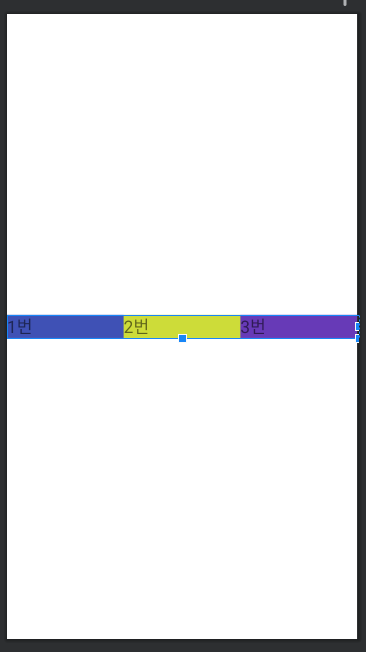
</LinearLayout>*layout_weight : 1 부여로 1 : 1 : 1 비율로 배열된 것을 확인 할 수 있다.
예시 5)
<LinearLayout
    xmlns:android="http://schemas.android.com/apk/res/android"
    android:layout_width="match_parent"
    android:layout_height="match_parent"
    android:gravity="center"
    android:orientation="vertical"
    >
<LinearLayout
        android:layout_width="match_parent"
        android:layout_height="300dp"
        android:weightSum="10"
        android:orientation="vertical">
        <TextView
            android:layout_width="wrap_content"
            android:layout_height="0dp"
            android:layout_weight="3"
            android:background="#3f51d5"
            android:text="1번"
            android:textSize="20dp"/>
        <TextView
            android:layout_width="wrap_content"
            android:layout_height="0dp"
            android:layout_weight="3"
            android:background="#cddc39"
            android:text="2번"
            android:textSize="20dp"/>
        <TextView
            android:layout_width="wrap_content"
            android:layout_height="0dp"
            android:layout_weight="4"
            android:background="#673ab7"
            android:text="3번"
            android:textSize="20dp"/>
    </LinearLayout>
</LinearLayout>
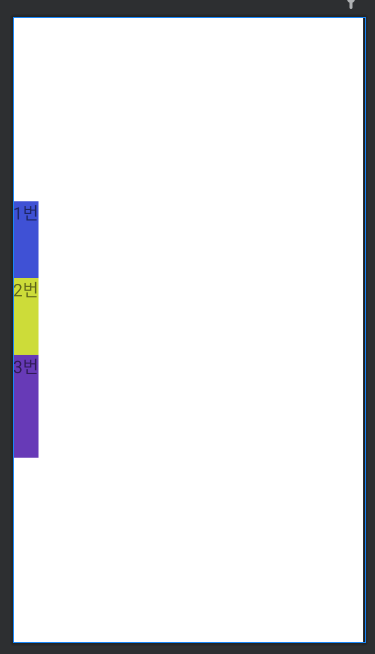
* weightSum 이 10이므로 layout_weight(3 ,3, 4) 가 총 더해서 숫자 비율이 맞아야한다.
2. RelativeLayout (관계 레이아웃)
자식 View, 부모 View 간의 관계에 따라 배치하는 레이아웃입니다.
|
layout_centerInParent |
부모 뷰그룹 영역에서 정중앙에 배치 |
|
layout_alignParentBottom |
부모 뷰그룹 영역에서 하단에 배치(왼쪽) |
|
layout_alignParentRight |
부모 뷰그룹 영역에서 우측에 배치(상단) |
|
layout_alignParentEnd |
부모 뷰그룹 영역에서 오른쪽과 해당뷰의 오른쪽을 일치 |
|
layout_centerHorizontal |
부모 뷰그룹의 가로 중앙에 배치(상단) |
|
layout_centerVertical |
부모 뷰그룹의 세로 중앙에 정렬(왼쪽) |
|
layout_above |
기준이 되는 뷰의 상단에 배치(왼쪽) |
|
layout_toRightOf |
기준이 되는 뷰의 오른쪽에 배치(상단) |
|
layout_below |
기준이 되는 뷰 하단 아래쪽에 배치 |
|
layout_toLeftOf |
기준이 되는 뷰 좌측의 왼쪽에 배치 |
예시 1) layout_centerInParent 사용
<RelativeLayout xmlns:android="http://schemas.android.com/apk/res/android"
    android:layout_width="match_parent"
    android:layout_height="match_parent">

    <TextView
        android:layout_width="50dp"
        android:layout_height="50dp"
        android:layout_centerInParent="true"
        android:background="#f44336" />
</RelativeLayout>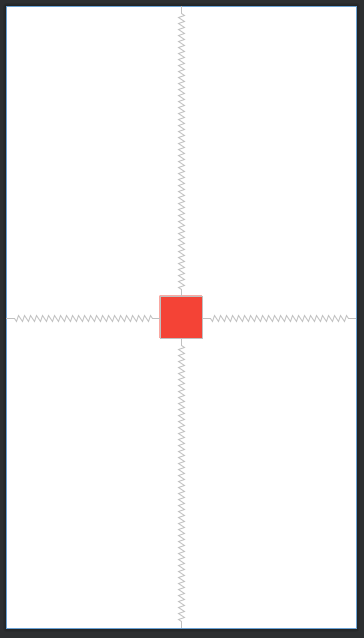
예시 2) layout_alignParentBottom 사용
<RelativeLayout xmlns:android="http://schemas.android.com/apk/res/android"
    android:layout_width="match_parent"
    android:layout_height="match_parent">
    <TextView
    android:layout_width="50dp"
    android:layout_height="50dp"
    android:layout_alignParentBottom="true"
    android:background="#e91e63" />

</RelativeLayout>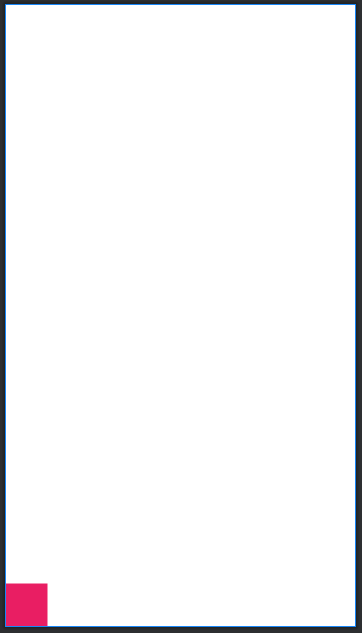
예시 3) layout_alignParentRight 사용
<RelativeLayout xmlns:android="http://schemas.android.com/apk/res/android"
    android:layout_width="match_parent"
    android:layout_height="match_parent">

    <TextView
        android:layout_width="50dp"
        android:layout_height="50dp"
        android:layout_alignParentRight="true"
        android:background="#FFEB3B" />
</RelativeLayout>
예시 4) layout_alignParentEnd 사용
<RelativeLayout xmlns:android="http://schemas.android.com/apk/res/android"
    android:layout_width="match_parent"
    android:layout_height="match_parent">

    <TextView
        android:layout_width="50dp"
        android:layout_height="50dp"
        android:layout_alignParentEnd="true"
        android:background="#3F51B5" />
</RelativeLayout>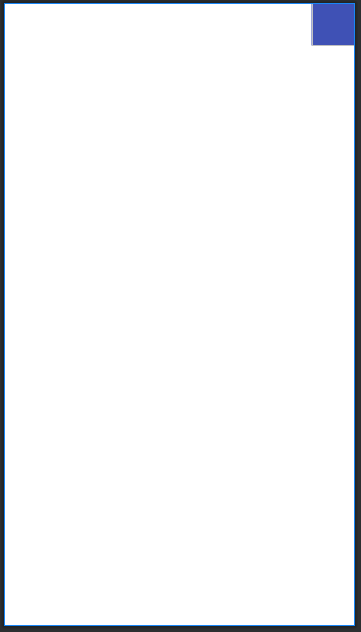
예시 5) layout_centerHorizontal 사용
<RelativeLayout xmlns:android="http://schemas.android.com/apk/res/android"
    android:layout_width="match_parent"
    android:layout_height="match_parent">

    <TextView
        android:layout_width="50dp"
        android:layout_height="50dp"
        android:layout_centerHorizontal="true"
        android:background="#FF9800" />
</RelativeLayout>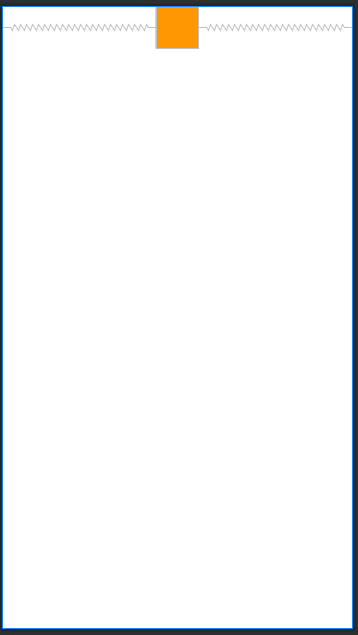
예시 6) layout_centerVertical 사용
<RelativeLayout xmlns:android="http://schemas.android.com/apk/res/android"
    android:layout_width="match_parent"
    android:layout_height="match_parent">

    <TextView
        android:layout_width="50dp"
        android:layout_height="50dp"
        android:layout_centerVertical="true"
        android:background="#FF9800" />
</RelativeLayout>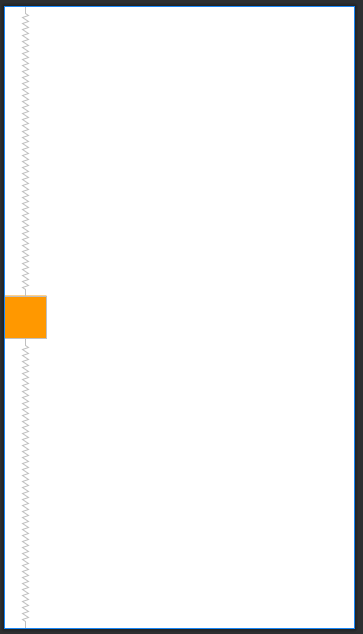
예시 7) layout_above 예시
<RelativeLayout xmlns:android="http://schemas.android.com/apk/res/android"
    android:layout_width="match_parent"
    android:layout_height="match_parent">
    <TextView
        android:id="@+id/view1"
        android:layout_width="50dp"
        android:layout_height="50dp"
        android:layout_centerInParent="true"
        android:background="#f23204" />
    <TextView
        android:id="@+id/view2"
        android:layout_width="50dp"
        android:layout_height="50dp"
        android:layout_above="@id/view1"
        android:background="#cddc39" />
</RelativeLayout>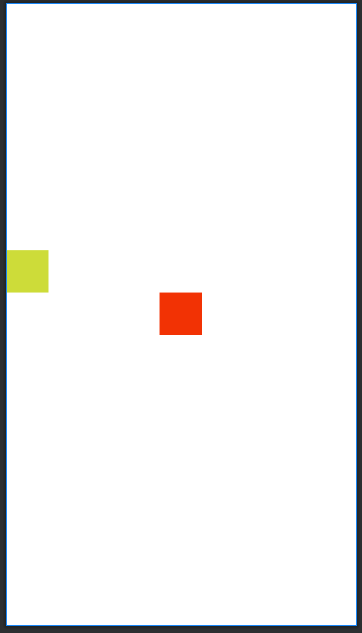
예시 8) layout_toRightOf 사용
<RelativeLayout xmlns:android="http://schemas.android.com/apk/res/android"
    android:layout_width="match_parent"
    android:layout_height="match_parent">
    <TextView
        android:id="@+id/view1"
        android:layout_width="50dp"
        android:layout_height="50dp"
        android:layout_centerInParent="true"
        android:background="#f23204" />
    <TextView
        android:id="@+id/view3"
        android:layout_width="50dp"
        android:layout_height="50dp"
        android:layout_toRightOf="@id/view1"
        android:background="#cddc39" />
</RelativeLayout>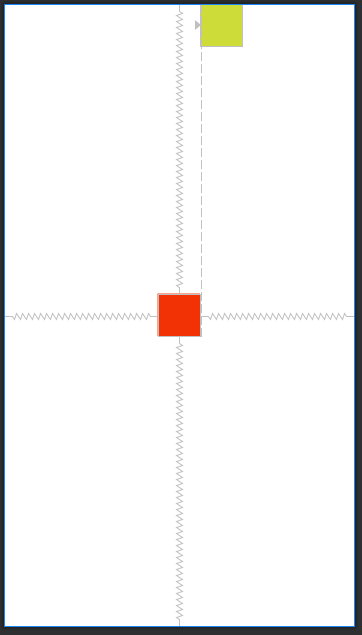
예시 9) layout_below 예시
<RelativeLayout xmlns:android="http://schemas.android.com/apk/res/android"
    android:layout_width="match_parent"
    android:layout_height="match_parent">
    <TextView
        android:id="@+id/view1"
        android:layout_width="50dp"
        android:layout_height="50dp"
        android:layout_centerInParent="true"
        android:background="#f23204" />
    <TextView
        android:id="@+id/view4"
        android:layout_width="50dp"
        android:layout_height="50dp"
        android:layout_below="@id/view1"
        android:background="#cddc39" />
</RelativeLayout>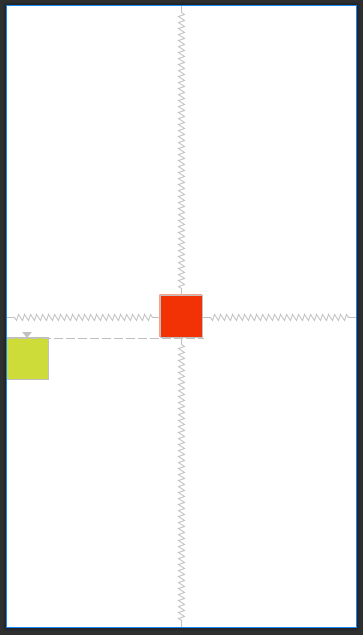
예시 10) layout_toLeftOf 사용
<RelativeLayout xmlns:android="http://schemas.android.com/apk/res/android"
    android:layout_width="match_parent"
    android:layout_height="match_parent">
    <TextView
        android:id="@+id/view1"
        android:layout_width="50dp"
        android:layout_height="50dp"
        android:layout_centerInParent="true"
        android:background="#f23204" />
    <TextView
        android:id="@+id/view5"
        android:layout_width="50dp"
        android:layout_height="50dp"
        android:layout_toLeftOf="@id/view1"
        android:background="#cddc39" />
</RelativeLayout>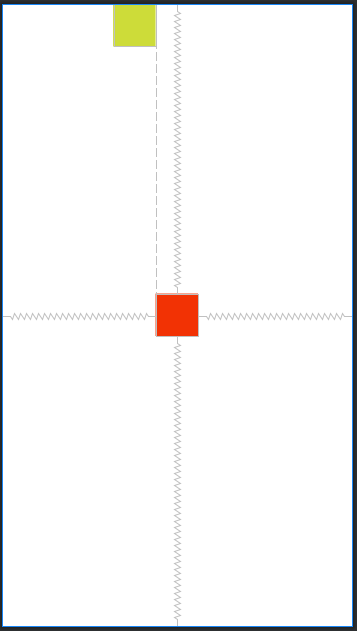
3. FrameLayout (프레임 레이아웃)
여러 개의 View를 중첩으로 배치하고 그 중 하나를 레이아웃의 전면에 표시할 때 사용하는 레이아웃입니다.
예시 1)
<LinearLayout xmlns:android="http://schemas.android.com/apk/res/android"
    android:layout_width="match_parent"
    android:layout_height="match_parent">
    <FrameLayout
        android:layout_width="wrap_content"
        android:layout_height="wrap_content"
        android:layout_marginTop="100dp">
        <TextView
            android:layout_width="300dp"
            android:layout_height="300dp"
            android:background="#2196f3"
            android:text="안녕하세요."
            android:textSize="30dp" />
        <TextView
            android:layout_width="200dp"
            android:layout_height="200dp"
            android:background="#673ab7"
            android:text="반갑습니다.."
            android:textSize="30dp" />
        <TextView
            android:layout_width="100dp"
            android:layout_height="100dp"
            android:background="#cddc39"
            android:text="또만나요."
            android:textSize="30dp" />
    </FrameLayout>
</LinearLayout>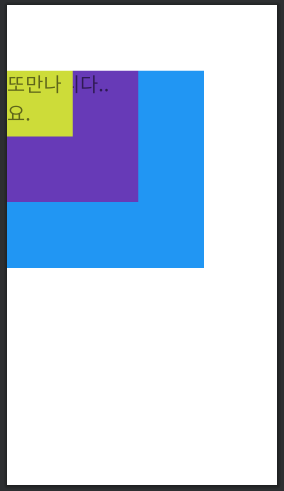
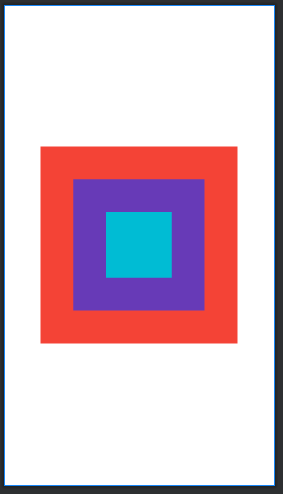
예시 2)
<RelativeLayout xmlns:android="http://schemas.android.com/apk/res/android"
    android:layout_width="match_parent"
    android:layout_height="match_parent">

    <FrameLayout
        android:layout_width="wrap_content"
        android:layout_centerInParent="true"
        android:layout_height="wrap_content">
        <TextView
            android:layout_width="300dp"
            android:layout_height="300dp"
            android:layout_gravity="center"
            android:background="#F44336" />
        <TextView
            android:layout_width="200dp"
            android:layout_height="200dp"
            android:layout_gravity="center"
            android:background="#673AB7" />
        <TextView
            android:layout_width="100dp"
            android:layout_height="100dp"
            android:background="#00BCD4"
            android:layout_gravity="center" />
    </FrameLayout>

</RelativeLayout>