[JAVA] 7. 반복문(while문 / for문)
프로그램 흐름을 제어할 수 있는 제어문 종류는 두 가지(조건문/반복문) 이 있다.
#반복문 (프로그램의 꽃)
특정 문장을 반복해서 실행해주는 것
사용자가 원하는 패턴 or 어떤 변화에 따라서 반복을 하면서 값이 바뀌는 형태 또는 어떤 프로그램을 반복해서 실행해주고 싶을 때 (예를 들면 게임처럼)
● while문
1. while 사용 방법
while(조건식) {
조건식이 true인 경우 반복할 문장;
}
* 조건식이 true인 경우, 중괄호 내용을 반복한다. == 조건식이 true인 동안 반복해라; 라는 뜻이다.
예시 1)
public static void main(String[] args) {
        int cnt = 1;
        while(cnt <= 5){
            System.out.println("안녕하세요. JAVA");
            cnt++;      // 만일 cnt++; 가 없다면, 무한루프가 된다.
        }
        System.out.println("현재 cnt의 값은 : " + cnt);
    }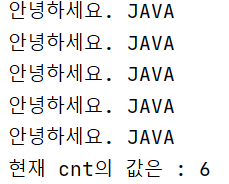
★ 해당 cnt의 결과 값을 보듯이 문장은 반복을 하며 조건이 맞지 않을 경우, 문장을 빠져나가는 것일 뿐 cnt++는 덧셈을 진행하기 때문에 6이된다.
따라서, 무조건 숫자가 맞지 않다고 실행을 하지 않는다고 생각하면 안 된다!
예시 2)
문제 : 입력받은 num의 숫자만큼 반복해서 숫자를 찍어주는 프로그램을 작성해보자
ex) 5를 입력 // 1, 2, 3, 4, 5
public static void main(String[] args) {
        Scanner sc = new Scanner(System.in);
        System.out.println("원하는 숫자를 입력하세요.");
        int num = sc.nextInt();
        int cnt = 1;

        while(cnt <= num){
            System.out.println("현재 cnt의 값은 : " + cnt);
            cnt++;
        }
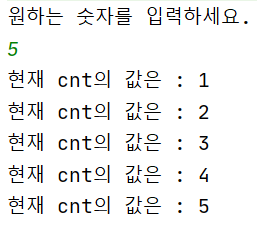
    }
예시 3)
문제 : 입력받은 숫자 모두를 더해보자
public static void main(String[] args) {
        Scanner sc = new Scanner(System.in);
        System.out.println("원하는 숫자를 입력하세요.");
        int num = sc.nextInt();
        int cnt = 1;
        int sum = 0;    // sum은 값을 더해서 누적하는 변수로 쓴다.

        while(cnt <= num){
            sum += cnt;     // sum = sum + cnt;
            cnt++;
        }
        System.out.println("1부터 " + num + "까지의 합계 : " + sum);
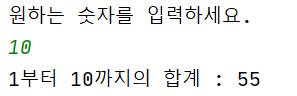
    }
예시 4)
문제 : 입력받은 숫자 중 짝수만 더해라!
public static void main(String[] args) {
        Scanner sc = new Scanner(System.in);
        System.out.println("원하는 숫자를 입력하세요.");
        int num = sc.nextInt();
        int cnt = 1;
        int sum = 0;    // sum은 값을 더해서 누적하는 변수로 쓴다.

        while(cnt <= num){
            if(cnt%2 == 0){     // 짝수는 2를 나눈 나머지 값이 0인 것
                sum+= cnt;
            }
            cnt++;
        }
        System.out.println("1부터 " + num + "까지의 합계 : " + sum);
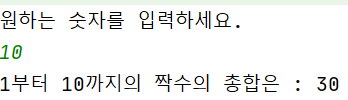
    }
예시 5)
● break : 반복문 또는 switch문에서 해당 문장을 빠져나가도록 하는 키워드 입니다.
● while(true)는 조건이 맞으므로 무한루프로 실행된다.
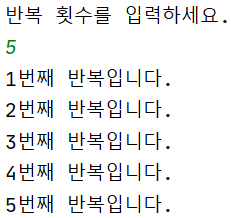
public static void main(String[] args) {
        Scanner sc = new Scanner(System.in);
        System.out.println("반복 횟수를 입력하세요.");
        int cnt = sc.nextInt();
        int num = 1;

        while (true) { 	// while(true)는 조건이 맞으므로 무한루프로 실행된다.
            System.out.println(num + "번쨰 반복합니다.");
            if (num == cnt) break;
            // num와 cnt가 같아지는 순간 break로 빠져나온다.
            num++;
        }
    }
예시 6)
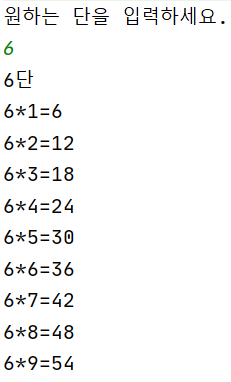
문제
원하는 단을 입력하세요. 5
5단
5 * 1 = 5
5 * 2 = 10
...
5 * 9 = 45
public static void main(String[] args) {
        Scanner sc = new Scanner(System.in);
        System.out.println("원하는 단을 입력하세요.");
        int dan = sc.nextInt();
        System.out.println(dan + "단");
        int num = 1;

        while(num >= 9){
            System.out.println(dan + "*" + num + "=" + (dan*num));
            num++;
        }
    }
예시 7)
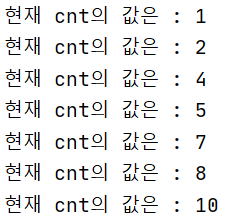
● continue : 반복문의 끝으로 이동해 다음 반복으로 돌아갑니다. 전체 반복 중 특정조건을 만족하는 경우만을 제외할 때 사용합니다.
1 2 3 4 5 6 7 8 9 10
(3의 배수를 제거)
결과값 -> 1 2 4 5 7 8 10
public static void main(String[] args) {
        int cnt = 0;

        while(cnt < 10){
            cnt++;
            if(cnt%3 == 0) continue;
            System.out.println("현재 cnt의 값은 : " + cnt);
        }
    }
● do-while 문
1. do-while 사용방법
do {
조건식이 true인 경우 반복할 문장;
}while(조건식);
★while 과 do-while의 차이점!!
while 문에서는 조건식이 애초에 true인 경우 반복 실행하나,
do-while의 경우 조건이 애초부터 false가 나오더라도 한 번은 실행하고 빠져나온다.
2. do-while 예시
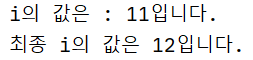
- do-while과 while의 차이점 실행
- while의 경우 조건식이 false이므로 실행하지 않는다.
public static void main(String[] args) {
        int i = 11;
        do {
            System.out.println("i의 값은 : " + i + "입니다.");
            i++;
        } while (i <= 10);
        System.out.println("최종 i의 값은 " + i + "입니다.");

        int j = 11;
        while(j<=10){
            System.out.println("j의 값은 : " + j + "입니다.");
            j++;
        }
    }
● for문
1. for 문 사용방법
for(변수의 선언 및 초기화; 조건식; 증감식) {
조건식이 true인 경우 반복할 문장 ;
}
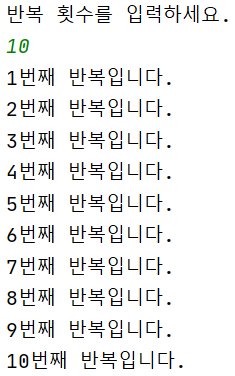
예시 1)
public static void main(String[] args) {
        Scanner sc = new Scanner(System.in);
        System.out.println("반복 횟수를 입력하세요.");
        int cnt = sc.nextInt();

        for (int i=1; i<=cnt; i++){
            System.out.println(i + "번째 반복입니다.");
        }
    }
예시 2)
- 문제
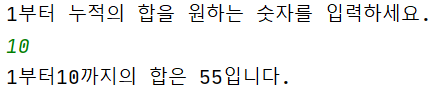
1부터 입력받은 숫자까지의 합을 출력하는 프로그램을 작성(for문)
public static void main(String[] args) {
        Scanner sc = new Scanner(System.in);
        System.out.println("1부터 누적의 합을 원하는 숫자를 입력하세요.");
        int num = sc.nextInt();
        int sum = 0;

        for (int i=1; i<=num; i++){
            sum += i;
        }

        System.out.println("1부터" + num + "까지의 합은" + sum + "입니다.");
    }
예시 3)
- 문제
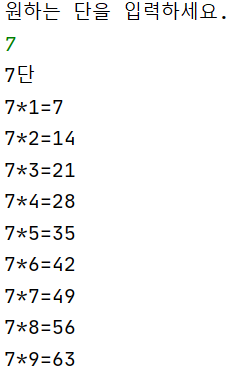
원하는 단을 입력받아 구구단을 출력하는 프로그램을 작성(for문)
public static void main(String[] args) {
        Scanner sc = new Scanner(System.in);
        System.out.println("원하는 단을 입력하세요.");
        int dan = sc.nextInt();
        System.out.println(dan + "단");

        for(int i=1; i<=9; i++){
            System.out.println(dan + "*" + i + "=" + (dan * i));
        }
    }
예시 4)
● 예시 추가 설명
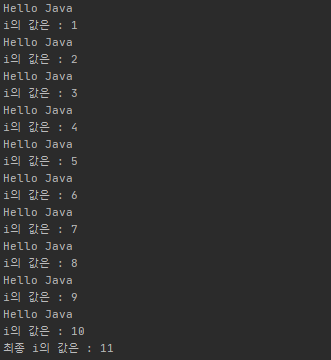
1. int i; 밖에서 만들어진 변수는 안/밖으로 변수 사용이 가능하다.
다만, for문 조건식 안에 만들어진 변수는 for문 안에서만 사용 가능하다.
2. for문 조건식에서 ;; 입력 시 무한루프가 된다.
3. 최종 i갑에서 " i--; " 무한루프를 돌려놓고 i를 1씩 빼준다. 만일, i = 1이 되면 빠져나온다.
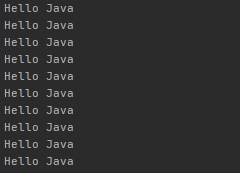
그러므로 hello java는 11에서 1씩 빠져 총 10개를 노출시킨다.
public static void main(String[] args) {
        int i;
        for(i=1; i<=10; i++){
            System.out.println("Hello Java");
            System.out.println("i의 값은 : " + i);
        }
        System.out.println("최종 i의 값은 : " + i);

        for(;;){
            System.out.println("Hello Java");
            i--;
            if(i == 1) break;
        }
    }
예시 5)
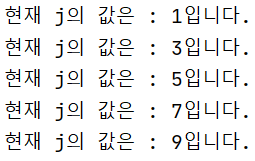
public static void main(String[] args) {
        for(int j=1; j<=10; j=j+2){
//            j= j+2 는 2씩 증가하게 만드는 조건식이다.
            System.out.println("현재 j의 값은 : " + j + "입니다.");
        }
    }
● 중첩 for 문
1. 중첩 for문 사용방법
for(변수의 선언 및 초기화1; 조건식1; 증감식1){
조건식1이 true인 경우 반복 할 문장;
for(변수의 선언 및 초기화2; 조건식2; 증감식2){
조건식2이 true인 경우 반복 할 문장;
}
}
------> for1은 전체 괄호 안을 반복 for2는 마지막 괄호-1 번째 안에서 반복한다. (하위 예시 확인)
예시 1)
public static void main(String[] args) {
        for(int i=1; i<=3; i++){
            System.out.println("현재 i의 값 : " + i);

            for(int j=1; j<=4; j++){
                System.out.println("----> 현재 j의 값 : " + j);
            }
        }
    }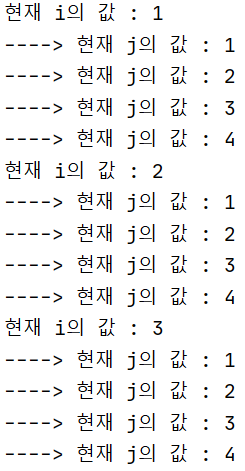
★for1이 3바퀴 돌 때마다 for2는 4바퀴씩을 돈다 따라서 총 바퀴수는 12번(4*3)이다.
예시 2)
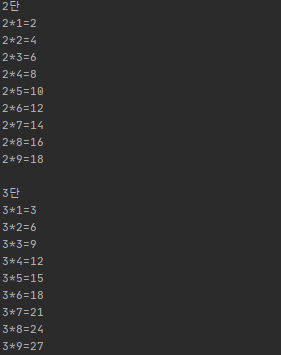
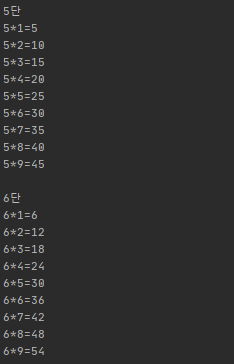
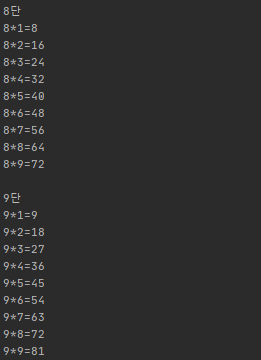
문제 > 2단부터 9단까지 중첩for문으로 구구단 완성해보자!
public static void main(String[] args) {
        for(int dan=2; dan<=9; dan++){
            System.out.println(dan + "단");
            for(int num=1; num<=9; num++){
                System.out.println(dan + "*" + num + "=" + (dan *num));
            }
            System.out.println();
        }
    }
예시 3)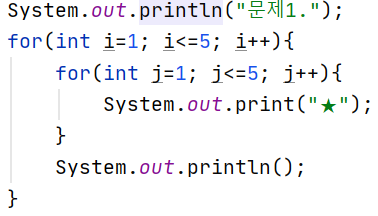
문제 1
★ ★ ★ ★ ★
★ ★ ★ ★ ★
★ ★ ★ ★ ★
★ ★ ★ ★ ★
★ ★ ★ ★ ★
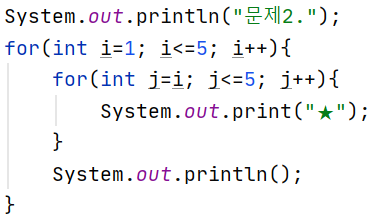
문제 2
★ ★ ★ ★ ★
★ ★ ★ ★
★ ★ ★
★ ★
★
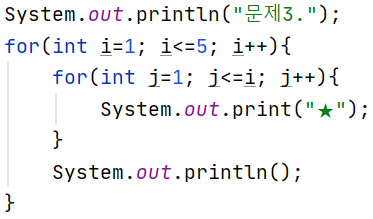
문제 3
★
★ ★
★ ★ ★
★ ★ ★ ★
★ ★ ★ ★ ★
● for each(for in) 문
1. 사용 방법
for(변수 변수명 : 배열 또는 객체) {
배열의 개수 또는 객체의 프로퍼티 개수 만큼 반복하면서 실행할 문장;
}
예시 1) 배열
for문(int i: arr) 뒤에 객체 또는 배열이 나올수 있는 for문 = arr.length랑 똑같은 뜻
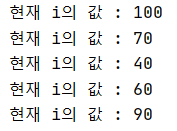
public static void main(String[] args) {
        int arr[] = new int[5];
        arr[0] = 100;
        arr[1] = 70;
        arr[2] = 40;
        arr[3] = 60;
        arr[4] = 90;

        for(int i : arr){
            System.out.println("현재 i의 값 : " + i);
        }
    }
예시 2) 객체
public static void main(String[] args) {
        String str6 = "번호 아이디 비밀번호 이름 연락처";
        String[] member = str6.split(" ");
        for(String str : member){
            System.out.println(str + " ");
        }
    }